
Why PETG leaves fine wisps between moves
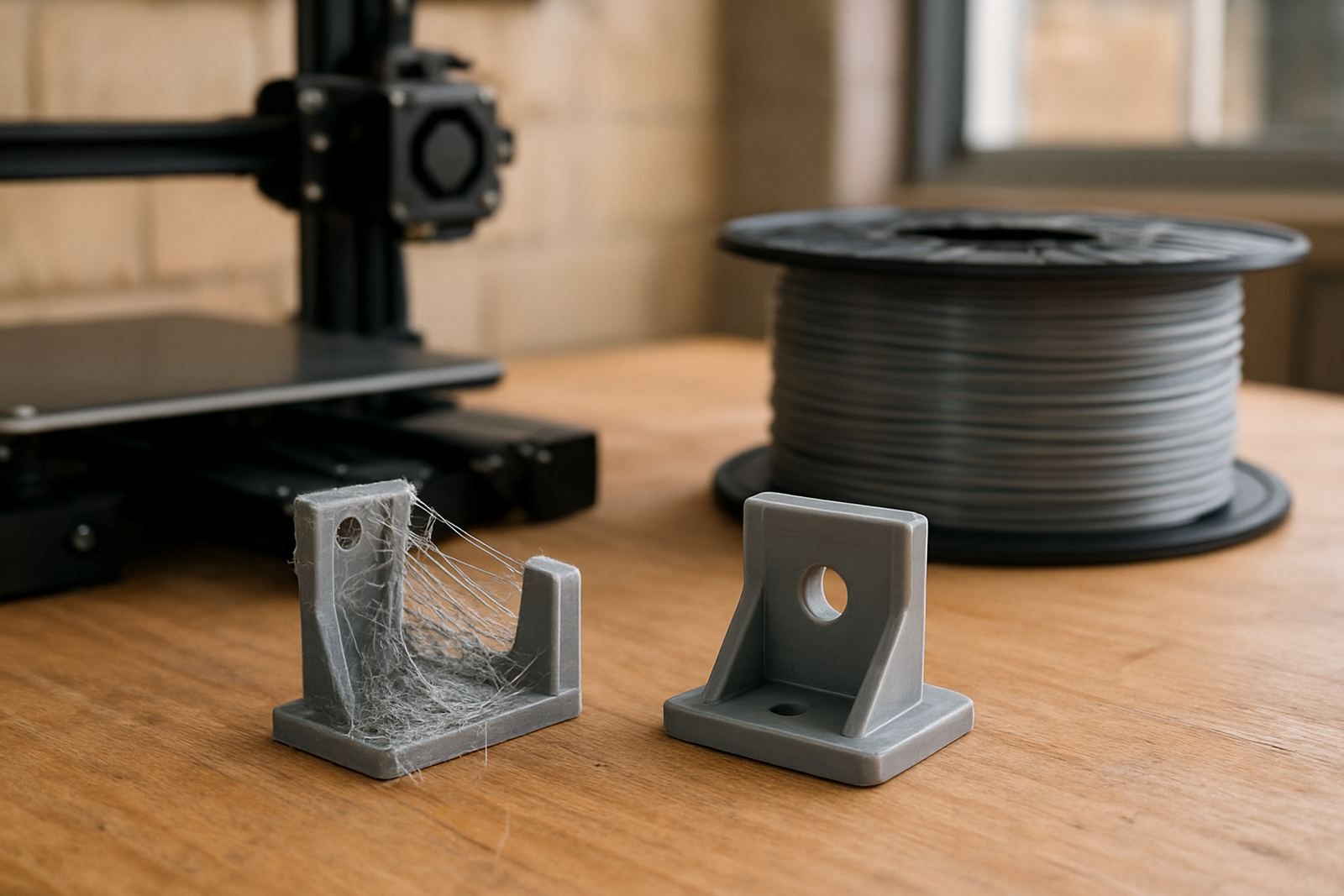
Stringing happens when a small amount of molten PETG oozes from the nozzle while the printer moves from one part of the job to another. Because PETG likes higher temperatures than many other materials, it can stay fluid enough to leave hair-like trails if the setup is not tuned carefully. That is why a print can look fine on the first few layers then start showing light webs across the gaps.
In South African workshops this often shows up after a hot afternoon shift, when the printer enclosure is warm and the room has little airflow. In coastal areas such as Cape Town or Somerset West, humidity can also play a part because moisture in the filament makes the melt behave less predictably. The result is usually not a failed print, just more cleanup than necessary.
Start with dry filament and sensible storage
Wet filament is one of the biggest reasons for stringing. If PETG has sat open in a workshop for days, it can pull in enough moisture to cause tiny steam bubbles inside the nozzle. Those bubbles push material out in thin lines and can also leave a rough surface or little pops in the print.
Keep reels sealed when not in use, and store them away from direct sun, workshop dust and high humidity. A simple storage cupboard in Epping or a sealed container with desiccant can make a real difference. If a reel has been left out for a while, drying it before a long run is often worth the effort.
- Use sealed storage with desiccant for opened reels
- Keep filament off concrete floors and away from open windows
- Dry material before critical jobs or long production runs
- Watch for popping, steam or a dull surface finish during the first layers
Tune temperature before you chase retraction
Many users increase retraction first, but temperature often needs attention before anything else. If the nozzle is hotter than the material needs, PETG flows too easily and keeps oozing between travel moves. A slightly lower print temperature can reduce stringing without hurting layer bond too much.
Make only one change at a time so you can see what actually helped. Drop the temperature in small steps and keep notes on the result. On a test print, a 5 degree change can be enough to turn a wispy part into a cleaner one. If the material starts under-extruding or the layers look weak, go back up a little. The sweet spot is usually where the print still bonds well but the nozzle does not leave much excess on travel moves.
Retraction settings that work in real workshops
Retraction helps pull molten PETG back from the nozzle before the print head travels. Too little retraction leaves strings. Too much can cause clogs, grinding or uneven feeding, especially on longer jobs with many short moves. Direct drive systems and Bowden setups need different settings, so it pays to test rather than copy numbers from someone else.
For small technical parts, especially those with many cut-outs and gaps, a careful retraction tune usually gives better results than a fast one. Keep travel moves as direct as possible and check whether combing or travel behaviour is dragging the nozzle across open spaces.
- Adjust retraction distance in small steps
- Adjust retraction speed only after the distance is close
- Reduce unnecessary travel over open gaps
- Use wipe or coast features only after basic settings are correct
If the machine starts clicking or the filament shows grind marks, the retraction is probably too aggressive. That is a common mistake on the first attempt and it can make the stringing worse not better.
Keep the nozzle, path and cooling under control
A dirty nozzle can hold old material at the tip and drag it across the print during travel. Wiping the nozzle, checking for partial blockages and making sure the hot end is stable can reduce wisps. Even a small amount of residue can leave tiny threads on clear covers or display parts.
Cooling matters too. PETG usually likes controlled cooling rather than a blast of air. Too much fan can weaken layer bonding, but too little can leave the surface soft for longer than necessary. The aim is balanced cooling so the material sets fast enough to stop oozing, yet still bonds properly. If your printer is in a warm room during load-shedding and the enclosure stays hot, you may need to compensate with a little more cooling or a slightly lower temperature.
Also make sure the build plate and first layer are right. A good first layer reduces dragging and stringy mess later in the job because the nozzle is not constantly fighting adhesion issues.
A Cape Town example: cleaner PETG on a small production run
A local signage workshop in Bellville was printing a batch of PETG brackets for indoor mounting. The parts were not failing, but the finish had fine strings between holes and around corners. The room was warm, the reels had been open for several days, and the operator had set a higher nozzle temperature to avoid under-extrusion on an earlier job.
After drying the filament, lowering the temperature a little and cutting back the retraction distance in small steps, the wisps dropped right away. The team still did a light cleanup, but the parts came off the bed looking much neater and the post-processing time was cut down. For a workshop running collection jobs from Parow, Claremont and Stellenbosch, that kind of saving matters because it frees up time for the next batch.
That example shows the main point: stringing is usually not one single problem. It is often a mix of heat, moisture and motion settings working together.
Quick checklist before your next PETG job
If you want fewer strings on your next print, work through the basics in order and avoid changing too many things at once. PETG is reliable when it is handled properly, but it does reward a careful setup.
- Dry the filament if it has been exposed to humidity
- Check that nozzle temperature is not higher than necessary
- Set retraction for your printer type and test it
- Keep the nozzle clean and the travel path sensible
- Use balanced cooling and a stable first layer
For sheet or filament orders, our Cape Town team can advise on the right material format for the job and courier filament nationwide. If you need sheet cut to size or help choosing material for a clean finish, send an enquiry through the contact page and we can help you work through the options.